How the Kaxori ATS Resume Checker Builds Its Review
Kaxori starts with one resume and one job description.
The checker compares the experience shown in that resume with the role's requirements, responsibilities, and language. It then organizes the review into score bands, alignment signals, keyword gaps, qualification questions, credibility checks, and formatting concerns.
Those outputs belong to the Kaxori workflow. They are not a copy of an employer's private ATS configuration.
Oracle's Job Application AI Rating, when enabled by an employer, displays ratings from 0 to 5 across education, experience, skills, and profile. Oracle says the feature is disabled by default.
Greenhouse Talent Matching is available on eligible subscription tiers with the Real Talent add-on and must be enabled by a Site Admin. It uses criteria defined and weighted by recruiters, then presents four scored categories plus a Needs manual review category.
These systems use different methods and outputs. Kaxori therefore presents its result as preparation guidance for one comparison, not as an employer's score.
Open the supporting panels to review whether:
- A required skill is not visible.
- Your resume uses language that is different from the posting.
- Relevant experience is buried under less important detail.
- A title or responsibility needs context.
- The document may not be processing cleanly.
The number opens the Kaxori review. The panels show what may deserve attention.
How to Read Kaxori Score Bands Without Treating Them as Predictions
Kaxori's bands help prioritize review. Even the strongest band cannot tell you whether a recruiter will call, whether the role is still open, or whether a hiring manager will value your background in the same way.
The number also cannot confirm that you meet every qualification or that the resume is believable.
Greenhouse describes its matching feature as assistive. Its documentation says the system does not automatically advance or reject candidates and that hiring decisions remain with recruiters and hiring managers. That is specific to Greenhouse, but it gives us a useful boundary: a matching result is not the same thing as a hiring decision.
Greenhouse also lets recruiters override a match score after manual review when a resume was not represented accurately. Candidates whose resumes cannot be processed are placed in Needs manual review and must be assessed by the hiring team. They are not automatically rejected.
The same boundary applies when you use a resume scanner before applying. A score can help you prepare. It cannot promise an interview, callback, ranking, or job offer.
Be careful with the opposite conclusion too. A low score does not automatically mean you are unqualified. The right experience may be present but hard to find. Your language may not match the role. A parser may miss part of the document. Or the job may require experience you do not have.
Those are different problems. They need different fixes.
Four Review Panels Behind Your Kaxori Result
Alignment
Is the resume pointed at this job?
Qualification
Do you actually meet the requirement?
Credibility
Can you support every claim?
Formatting
Can the information be found and read?
Alignment
Alignment asks whether the resume is pointed at this job.
You may have strong experience, but the opening summary and first few bullets may emphasize work that is not central to the role. If the posting is focused on revenue forecasting and your resume leads with general team leadership, the reader has to do the matching work.
The fix is prioritization. Move the most relevant, supported proof closer to the top. Use the role's normal language when it accurately describes your work.
Qualification
Qualification asks whether you actually meet the requirement.
If the role requires an active professional license and you do not have it, that is not a keyword problem. If it requires five years with a specific platform and you have never used that platform, changing a sentence will not close the gap.
This is where a score can tempt people into the wrong edit. Do not add a term simply because the checker marked it missing. First decide whether the term represents experience you have, related experience you can explain, or a real qualification you lack.
Credibility
Credibility asks whether a person can trust the language.
A resume can contain every right phrase and still feel weak. Generic claims such as "results-driven leader" do not show what happened. Inflated claims create a larger problem. If you cannot explain the statement, identify your role, and support the result in a real conversation, it does not belong on the page.
Harvard's resume guidance recommends writing to "express not impress" and keeping resume language fact-based. That is good advice for both the screen and the human being who comes next.
Formatting
Formatting asks whether the information can be found and read.
Some systems parse resume text before using it in a matching feature. Greenhouse requires resume parsing for full Talent Matching functionality. If a resume cannot be processed, Greenhouse places the candidate in Needs manual review for human assessment.
Because products handle files differently, broad formatting rules deserve care. Test the actual file. Keep headings clear. Use a logical reading order. Make sure the text survives copying and extraction. Then read the document as a person would.
Aim for a document that removes avoidable friction for both the system and the person reading it.
How Kaxori Separates Missing Qualifications from Missing Language
When a checker flags a keyword, ask four questions:
- Does this term describe work I have actually done?
- Is the same experience already present under different language?
- Can I support the term with a specific example, result, or responsibility?
- Would I be comfortable discussing it in an interview?
Pause before adding it.
Look for the responsibility, result, tool, or example behind the term.
Use the role language naturally and make the supporting experience visible.
Treat it as a qualification gap, not a writing problem.
If the answers are yes, you may have a language gap. Rewrite the relevant line naturally and add the proof.
If the answers are no, you may have a qualification gap. Leave it out. Decide whether your adjacent experience is strong enough to make the role worth pursuing.
The University of Texas at Austin's ATS guidance recommends using job-description keywords when they match your experience. That final condition is the part people skip. Use matching language to clarify the truth. Never use it as a substitute for real experience.
Use the Credibility Test After a Kaxori Check
Choose any important line on your resume and check five things:
- Noun: Is the tool, product, customer, team, or process real?
- Number: Can you explain where the result came from?
- Verb: Does the action match what you personally did?
- Title: Is your level of responsibility represented accurately?
- Claim: Could a former manager or colleague recognize this version of the story?
If one part makes you hesitate, slow down.
You may only need to narrow the language. "Led the launch" might become "coordinated launch readiness across sales and operations." Accuracy makes the responsibility more believable than borrowed authority.
Kaxori Workflow Example: Improve Evidence, Not Just the Number
The new line uses relevant language, gives the reader real evidence, and stays within the candidate's actual role.
That is the difference between closing a communication gap and manufacturing a match.
What to Review Before You Run Kaxori Again
- Compare the resume with one specific job description.
- Separate missing qualifications from missing language.
- Move the strongest relevant proof where it can be seen.
- Use supported role language naturally.
- Review every noun, number, tool, title, and claim.
- Confirm the document remains readable to a person.
- Save the exact version used for the application.
Do not keep editing only to make a number move. Stop when the document is aligned, accurate, readable, and ready for a real conversation.
How Kaxori Supports the Review
Kaxori compares the resume you provide with the specific job description you are targeting. It organizes the review into ATS match information, keyword gaps, fit signals, and practical next steps.
Kaxori's truth-first approach helps you present real experience clearly while keeping unsupported qualifications off the page.
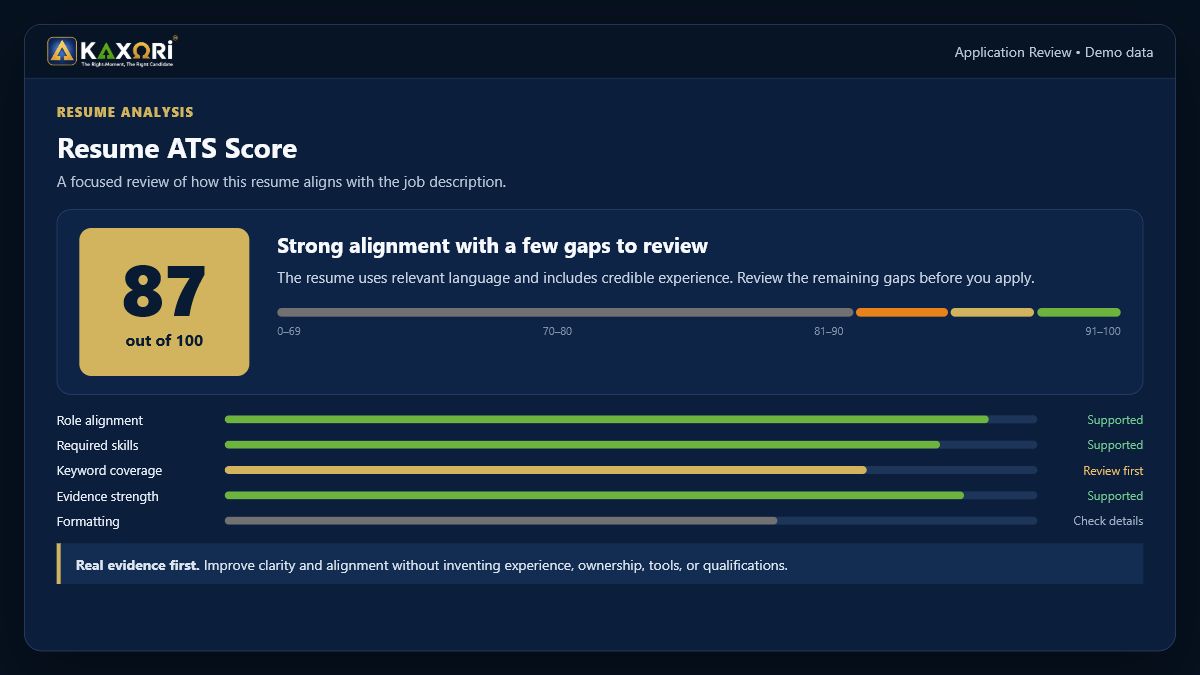
Look behind the score
The score organizes the review. The supporting signals show what deserves attention before you apply.
When you are ready to continue, Kaxori will guide you through the access options currently available.
The Honest Limitation
No ATS checker, including Kaxori, can represent every employer's hiring process.
Different products may evaluate different inputs, use different criteria, and display different results. A checker does not know every hiring manager's priorities. It cannot see every business constraint behind a role. It cannot guarantee that a recruiter will review the application.
Use the result to ask better questions. Keep the final decision about what belongs on your resume in human hands.
Frequently Asked Questions
What do Kaxori ATS score bands mean?
Kaxori score bands organize one resume-job comparison into levels of review. They are Kaxori product guidance, not an industry standard or hiring prediction. Open the supporting signals to see what deserves attention.
Which Kaxori review panel should I open first?
Start with the panel showing the clearest supported issue: alignment, qualification, credibility, or formatting. Fix one issue you can verify before running another comparison.
Why can Kaxori show a formatting or parsing concern?
Kaxori can flag document features that deserve review, but products process files differently. Confirm that headings, text order, and copied text remain readable before applying.
How should I use keyword gaps in Kaxori?
Treat each gap as a question. Add the language only when it accurately describes experience you can support; leave it out when it represents a qualification you do not have.
What does the Kaxori score not predict?
Kaxori does not predict recruiter interest, ranking, interviews, offers, or the rules inside an employer's private hiring system. It helps you prepare one clearer, more credible application.
When should I run another Kaxori check?
Run another check after a meaningful, supported edit or when you compare the resume with a different job. Repeated scans without a clear change can turn review into score chasing.
What should I do after reviewing my Kaxori result?
Read the resume as a person, confirm every claim, save the exact version, and apply. The Kaxori result organizes preparation; it does not replace human judgment or follow-up.
Sources
- Oracle, Redwood Experience: Job Application AI Rating. Accessed July 29, 2026.
- Greenhouse, Talent Matching. Accessed July 29, 2026.
- Harvard FAS Mignone Center for Career Success, Harvard College Guide to Creating a Strong Resume. Accessed July 29, 2026.
- The University of Texas at Austin College of Natural Sciences Career Services, Applicant Tracking Systems. Accessed July 29, 2026.
The Right Moment, The Right Candidate
Ready to put the guide into practice? Continue to Kaxori. The current sign-up experience will guide you through the access options available today.